
Appearance
Browser tests
dqx e2e runs your Playwright suite in the stack: the browsers come with the project, and they open the real local site over https, through the router, against a database the suite may wipe.
bash
dqx e2e                          # the whole suite
dqx e2e --project chromium       # anything after `e2e` goes to `playwright test`
dqx e2e --no-reset               # keep the data that is there
dqx e2e --ui                     # Playwright's UI mode, in your browser
dqx e2e --headed --slowmo 500    # a visible browser on this machine, a pause per action
dqx e2e --report                 # serve the report the last run wrote
dqx e2e --show-trace <file>      # serve one trace
What it replaces
Playwright's browsers need glibc, and the fleet's PHP image is Alpine, so they cannot run in the application's container. The usual answer is for every developer to install Node and three browsers on their own machine and point the suite at the development site. That works until a journey registers a user or creates a record, because then the suite is writing to the database you develop against.
So the browsers move into a container of their own, and the suite gets a site of its own.
Setting it up
Two things in .dq/config.yml. First a browser container, which is the whole declaration:
yaml
services:
  - name: playwright
dqx fills in the rest: the image for the @playwright/test your checkout has installed, a command that keeps the container alive, the checkout mounted, the router's network, and this machine's certificate authority so the browsers trust your local domains. See a second database on one checkout for the site:
yaml
sites:
  - domains: { primary: example.dqx }
    database: example
    repositories: [{ repository: example-app }]

  - domains: { primary: e2e.example.dqx }
    directory: example.dqx
    database: example_e2e
    env:
      DB_DATABASE: example_e2e
      APP_URL: https://e2e.example.dqx
Then dqx sync && dqx up.
What a run does
- Resets that site's database, with
migrate:fresh --seedagainstexample_e2eand nothing else, or with the site's owne2e.reset.--no-resetskips it. - Runs each site's
e2e.setup, in the app container,--no-resetor not. - Runs the suite in the browser container, with
E2E_BASE_URLset to the site's https address and one address per site beside it. - Exits with Playwright's own exit code, so a failing suite fails whatever ran dqx.
Reports, traces and screenshots land wherever your playwright.config.ts puts them. The checkout is mounted rather than copied, so they are already in your working tree when the run ends.
Your node_modules are the ones that run
The runner and @playwright/test are plain JavaScript, so the copy installed on your machine drives the browsers inside the container. There is no second install to keep in step.
From the dashboard
A project with a browser container gets a Browser tests section in its card in the dashboard. It says how the last run ended, and after a failure it opens on its own with each failed test's name, error and first screenshot.
- Run runs
dqx e2ein the project, the whole suite with the reset. The output streams into the card the way a start does, and the result line says Playwright's own counts:6 failed · 2 passed. - Open results opens the run in a tab of its own: every failure with its error, screenshots and video, a trace in the report's own viewer, the logs the run left, and the full Playwright report. It is served from
127.0.0.1, which is why the trace viewer and the videos load there and not from Finder.
While a run goes, the section counts it: running 3 of 6 · 1 failed, with a bar under it.
Unfolded, the section lists every journey of the suite, each with how it went the last time it ran and how long that took; a journey that failed shows its error and first screenshot under it. The journeys are grouped by tag, each under its rarest one, so a tag every journey shares (@mijn) does not make one big group and @crm and @pt each get theirs. A group whose tag is a site's (@<e2e name>, as dqx e2e init writes it) is called by that site, crm.acme.test (@crm / @mijn), with the tags all its journeys share after it. A group has one Run for its tag, a journey shows its own Run when you point at it, and Run failed appears beside the section's Run when a journey's latest outcome was a failure. The list is Playwright's own (playwright test --list), asked of the browser container, so the journeys are there before the first run; while that container is not running, the last report's tests stand in. The page only names the journey or the tag; dqx looks it up in that list and runs that, so anything the suite does not have is refused.
A run of part of the suite from the dashboard writes its report and results to .dqx/partial/ in the suite (dqx e2e --partial), so Open results and the full Playwright report keep showing the last full run. Each journey's outcome in the list is still its latest, from either. When the report holds fewer journeys than the suite, its link says so (Playwright report · 1 of 6 journeys), as a report from an older partial run does until the next full one. The report opens in the dashboard's light or dark theme.
dqx also keeps every run's outcome, read from the data Playwright's HTML report carries, so nothing is added to the suite's config. The results page opens with an overview of the last 7 days: how many tests, the success rate (flaky counted as passed), how many are healthy, flaky or failing, a strip of the runs, and per test its failure rate, average duration, spread and recent outcomes. A test is failing when its last run failed, flaky when it passed only on a retry or both passed and failed this week. The history is per machine, in ~/.local/share/dqx/e2e/, and grows with every run dqx sees: one from the card, one from a terminal, or a report copied into the suite.
Behind Run's caret, Run and watch runs the suite in a browser window on your machine, slowed down to follow and keeping every trace (--headed --slowmo 500 -- --trace on), and Open in Playwright UI opens Playwright's UI mode in a tab of its own (--ui), in the dashboard's light or dark, to pick journeys and step through them; Stop on the browser tests page ends it. Anything with other arguments is a terminal job. In a read-only dashboard Run is disabled.
A report from somewhere else
A CI artifact, downloaded and unzipped, opens the same way:
bash
dqx e2e --open-report ~/Downloads/reportsdqx finds the report and the results in the folder (by the report's title and by .last-run.json, so any outputDir works), serves them on 127.0.0.1 behind a token for this run, and opens the run page. It stops with Ctrl-C.
Watching a run, and reading it afterwards
--ui starts Playwright's UI mode: pick tests, watch them run, re-run one. --report serves the HTML report the last run wrote, which is where traces are opened.
Both are served from the container, so dqx publishes two ports for them and prints the address to open. The numbers are derived from the project like every other published port, so they are the same after a restart and a bookmark keeps working (the UI's dqx page takes a free port each time):
bash
dqx e2e --ui
#   http://127.0.0.1:52229/  (ctrl-c to stop)
#   Playwright's UI on its own: http://127.0.0.1:23386

dqx e2e --report reports/e2e/html
#   http://127.0.0.1:23385  (ctrl-c to stop)
Playwright prints an address of its own, on its container-side port. Open the one dqx prints; the other is not reachable from your machine.
--ui opens the UI in a tab of its own, inside dqx's header: dqx serves it on 127.0.0.1 with the UI under ui/, so the page and Playwright's own theme setting share one origin. Opened from the dashboard's Open in Playwright UI, the tab takes the dashboard's light or dark; from a terminal it follows the system. The UI on its own stays on the published port, which dqx prints beside it.
Name the folder when your config moves the report
show-report looks in playwright-report. A project that sets outputFolder, or that only configures the HTML reporter in CI, has to say where: dqx e2e --report reports/e2e/html. Pin the ports by name under ports: in .dq/config.yml if you want particular numbers, as playwright-9323 and playwright-9324.
--headed runs the suite as always, in the container, against a browser that opens a window on your machine: Playwright's server runs here, and a small proxy in the browser container's namespace lets the suite reach it on 127.0.0.1 (the server accepts only a local Host). It needs npx; the first run downloads Chromium for the @playwright/test version the suite installed. dqx e2e --headed --slowmo 500 pauses before every action, so a fast journey can be followed. It replaces the suite's own launchOptions for that run; Playwright's server would keep only channel, timeout and proxy of those anyway.
One trace on its own, when you know which one you want:
bash
dqx e2e --show-trace reports/e2e/results/a-failing-test/trace.zipIt is --show-trace and not --trace, so that dqx e2e --trace on still reaches Playwright's own flag and records them.
A viewer outlives ctrl-c
Interrupting one of these stops the client on your machine, not the server inside the container. The next viewer would find the port taken and fall back to a random one that nothing publishes, so dqx stops a previous viewer before it starts the next. That is why the address always answers the run you just started.
Pointing the suite at the site
Read the address from the environment rather than hardcoding it, so the same suite runs here and in CI:
ts
export default defineConfig({
    use: {
        baseURL: process.env.E2E_BASE_URL ?? 'https://example.dqx',
    },
});
Every site gets one too, for a journey that crosses apps: E2E_<NAME>_URL, where <NAME> is the first label of the site's domain in capitals (crm.example.dqx is E2E_CRM_URL). A site sets its own with e2e.name, and two sites that would share a name are refused before anything runs:
yaml
sites:
  - domains: { primary: api.example.dqx }
    e2e: { name: portal }      # E2E_PORTAL_URL
With a mailpit service, E2E_MAILPIT_URL is http://mailpit:8025: Mailpit's API, for a test that reads the mail an app sent.
Starting a suite: dqx e2e init
bash
dqx e2e init            # what it would do
dqx e2e init --write    # do it, then install the suite
In a Laravel project init sets up Pest browser tests instead; --playwright asks for the TypeScript suite there, and a project that already has one keeps it. For a Playwright suite it proposes where the suite goes (its own repository at www/<key>-e2e in a multi project, tests/e2e in a single-repo one), what .dq/config.yml gets, and the files to start from:
- the config: the
playwrightservice,e2e.directory, ane2e.nameonly where two sites would share a URL variable, ande2e.commands.scenariofor a Laravel site whosephp artisan listhase2e:scenario(asked of the running stack, sodqx upfirst). Only those lines change; comments, order and everything else in the file stay as they were. - the suite:
package.jsonwith@playwright/testpinned,playwright.config.ts(the report inreports/html, failures intest-results, where the dashboard reads them),.env.examplewith every site'sE2E_<NAME>_URL, support for the relay, Mailpit and the URLs, one tagged journey per site, a README. - CI:
ci/README.mdwith two ways, against an environment that already runs or with the applications in the pipeline, and in a multi project abitbucket-pipelines.ymlfor the first.
A file that is already there is kept, and a folder that already holds a suite (a package.json) keeps every file: init only brings the config up to it. Nothing in a site's own code is written. The suite repository is yours to create: git init, push it, and run init again with --repository <url> so dqx install clones it. An agent does the same with dqx_e2e_init.
Every site answers first
Before the reset, dqx e2e asks every site of the project over https. A journey that crosses apps fails at the first one that is down, half a minute per journey, so a site that answers nothing or a gateway error (502, 503, 504) stops the run before anything is wiped:
text
mijn.acme.test answers 502: its dev server is not running. Start it with `dqx dev --site mijn.acme.test`.
Nothing ran. Start what is down, or run with --no-site-check.
A redirect, a 404 or the application's own 500 counts as an answer. The dashboard's Run and dqx_e2e check the same way.
Running part of a suite
Everything after -- goes to Playwright:
bash
dqx e2e -- tests/journeys/checkout.spec.ts      # one file
dqx e2e -- tests/journeys/checkout.spec.ts:42   # one test, by its line
dqx e2e -- --grep @crm                          # the journeys tagged @crm
dqx e2e -- --last-failed                        # what failed the last time
dqx e2e --partial -- --grep @crm                # the same, with the report kept apart
A tag names the apps a journey goes through, test('registration', { tag: ['@mijn', '@crm'] }, …), so a journey across two apps is in both runs. The journeys dqx e2e init writes carry their site's tag. The dashboard offers the same: a journey's own Run, Run failed, and a Run per tag. With --partial the report and results go to .dqx/partial/ and the last full run's report stays where it is; add .dqx/ to the suite's .gitignore (dqx e2e init does).
A suite of the project's own
A journey across several apps belongs to none of them. Put it in its own repository under www/ and name it:
yaml
e2e:
  directory: www/example-e2e
dqx e2e then runs the suite there, and dqx sync matches the browser image to the @playwright/test installed in that folder. dqx install runs npm install in it after the sites' own (with install.npm, on docker), and dqx install --only npm includes it. In a single-repo project the path is from the project root.
A suite that belongs to the project's own repository can live beside www/ instead, for example e2e: {directory: e2e}. dqx then mounts it at /var/www/<last segment> in the app and the browser container, and the dashboard reads its runs from that folder. dqx sync refuses when www/<last segment> also holds files, since the mount would hide them. The browser container gets the code and the suite only: never the SSH key or the composer credentials the app has.
The suite is not a site, so dqx clones it only when the project lists it under its own repositories, which land under www/ at their path:
yaml
repositories:
  - repository: example-e2e
    path: example-e2e          # www/example-e2e
e2e:
  directory: www/example-e2e
Resets and setup
Per site, under e2e:
yaml
sites:
  - domains: { primary: e2e.example.dqx }
    e2e:
      reset: php artisan migrate:fresh --seeder=E2eSeeder --force
      setup:
- php artisan e2e:scenario baseresetreplacesmigrate:fresh --seed, run withsh -lcin the app container;falseturns it off for that site.setupruns after every reset and before the suite, in the same container and environment. It is how a suite gets the data a scenario command seeds.
Without e2e.directory only the site the suite runs against is reset and set up. With it, every site that declares a reset or a setup gets it in the same run, in config order; a site that declares no reset is not reset at all. A site served from its own checkout is refused any reset, its own included, because its database is the one you develop against.
Commands a journey runs during the run
A journey that creates its own people needs the application's answer while it runs, and the browser container has no docker to ask with. List the commands a test may run, per site:
yaml
sites:
  - domains: { primary: crm.example.dqx }
    e2e:
      commands:
        scenario: php artisan e2e:scenario
dqx e2e then starts a small relay for the run and tells the suite where it is: E2E_RUN_URL and E2E_RUN_TOKEN. A test posts the site's name (the <NAME> of its E2E_<NAME>_URL, in any case), the command's name and its arguments:
ts
const response = await fetch(`${process.env.E2E_RUN_URL}/run`, {
    method: 'POST',
    headers: { authorization: `Bearer ${process.env.E2E_RUN_TOKEN}` },
    body: JSON.stringify({ site: 'crm', command: 'scenario', args: ['member'] }),
});
const { exitCode, output } = await response.json();
The command runs in that site's app container and environment, like a reset or a setup, with the arguments quoted onto its line, and up to 30 minutes. output is its stdout, or both streams when it failed. A command the config does not list answers 404 with the ones it does; a request without the run's token answers 401. The relay listens on the machine's own 127.0.0.1 only, which the containers reach as host.docker.internal, and stops when the run does.
Without E2E_RUN_URL, on the host or in CI, a suite can keep calling docker exec itself.
A suite from dqx e2e init has this in tests/support/run.ts: runInSite('crm', 'scenario', ['member']) goes through the relay inside dqx e2e and through docker exec on the host.
People for a journey: scenarios in a Laravel site
A journey that needs a person in a state the seeders do not make (registered, with a renewal due, with something waiting in a queue) asks the site for them at its start. In a Laravel site that is php artisan e2e:scenario <name>, and dqx writes it:
bash
dqx e2e scenario init            # preview: which site, which files, the config line
dqx e2e scenario init --write
It picks the site you stand in, the one named with --site, the one whose e2e.commands already lists scenario, or the only Laravel app there is, and adds scenario: php artisan e2e:scenario to that site's e2e.commands. The files go into the site's own code:
| File | Whose |
|---|---|
app/Console/Commands/E2eScenario.php | dqx's: the command, its phases, draining the queues |
app/Support/E2e/Scenario.php, Run.php, Steps.php | dqx's: what a scenario is, one run (its id, password, an address per role), and the steps a scenario may add |
app/Support/E2e/Scenarios.php | the app's: its scenarios by name, its queues, how its People is made, what every run shares |
app/Support/E2e/People.php | the app's: extends Run, with the app's own models |
app/Support/E2e/MemberScenario.php | the app's: a first scenario to copy from |
An app that has a Scenarios.php already gets dqx's three files only. A file that is there is kept.
A run prints JSON; every address in it is unique to the run, so runs never meet each other's data and nothing is cleaned up first:
bash
dqx artisan e2e:scenario member
# {"scenario":"member","run":"k3x9a2qp","password":"…","people":{"noor":{"email":"e2e.member.noor.k3x9a2qp@example.org","id":1}}}
dqx artisan e2e:scenario member --phase=queue --run=k3x9a2qp   # runs what was queued, then reports again
dqx artisan e2e:scenario member --phase=state --run=k3x9a2qp   # reports what the journey created since
The command refuses to run outside the local, e2e and testing environments.
A scenario can have steps of its own beside the three phases, for what a browser cannot do: run a monthly command for this run's people only, or invoice what the journey ordered. It implements Steps, and each step is a phase:
php
/** @implements Scenario<People> @implements Steps<People> */
class ShopScenario implements Scenario, Steps
{
    public function steps(): array
    {
        return ['invoice' => fn (People $people) => /* what the monthly command does, for this run */ null];
    }
}
bash
dqx artisan e2e:scenario shop --phase=invoice --run=k3x9a2qp # runs the step, then reports the stateAn unknown phase answers with the list, the scenario's own steps included.
A new scenario
bash
dqx e2e scenario new member-renewal --writewrites MemberRenewalScenario (fill in start() and state()), adds 'member-renewal' => new MemberRenewalScenario, to Scenarios::all(), and, when the project has a suite with tests/support/run.ts (which dqx e2e init writes), a journey tests/journeys/member-renewal.spec.ts tagged with the site that asks for it through the relay. A suite without that file gets no journey, since a spec importing a file that is not there breaks the whole run; start the scenario there the way its other journeys do. A name is lower-case words joined by -; one that is taken is refused.
Keeping dqx's files up to date
dqx's three files carry a stamp in their docblock (dqx:<hash>). dqx e2e scenario update compares each with today's version:
- current: the same, whitespace aside, so a formatter such as Pint keeps it dqx's;
- replace: still as dqx wrote it, an earlier version:
--writereplaces it; - kept: changed since, or without a stamp (written before dqx did): it is the app's, and named;
- new: missing:
--writewrites it.
The app's own files are never touched. An agent does all three with dqx_e2e_scenario (action: init, new or update), shown first and written only when asked.
The image has to match what you installed
The official image ships only the browsers of its own version. dqx sync writes the tag for the version in your node_modules, and dqx doctor reports the two drifting apart. Left alone, the failure arrives from inside the container as Executable doesn't exist at /ms-playwright/chromium-…, which reads as a broken image rather than as two versions out of step.
If you pin the image yourself, keep it equal to the installed @playwright/test.
Certificates, and why they matter here
The browsers have to trust the certificate the router serves, or every page is an error. mkcert installs its root in your machine's system store, which no container has, so dqx copies it in: the system store, the NSS database Chromium reads, and an enterprise policy for Firefox.
Prefer that over ignoreHTTPSErrors. A suite asserting anything about a secure context, such as crossOriginIsolated or Trusted Types, needs real https to be meaningful, and plain http only counts as secure on localhost.
Firefox is the exception
Chromium and WebKit trust the root and run against real https. Playwright's own Firefox build does not, and this is an open upstream gap rather than something dqx can arrange (playwright#35815). Measured on v1.63.0-noble with Firefox 155, it answers SEC_ERROR_UNKNOWN_ISSUER with the root in the system store, in Chromium's NSS database, in the system NSS database at /etc/pki/nssdb, with an enterprise policy beside the binary, and with security.enterprise_roots.enabled set through firefoxUserPrefs. The libnssckbi.so trick that used to work stopped at Playwright 1.52 and Firefox 137, which no longer respect a local copy of it.
Give that one project ignoreHTTPSErrors until upstream lands a mechanism:
ts
projects: [
    { name: 'chromium', use: { ...devices['Desktop Chrome'] } },
    { name: 'webkit', use: { ...devices['Desktop Safari'] } },
    {
        name: 'firefox',
        // Playwright's Firefox does not read the local certificate authority dqx installs.
        use: { ...devices['Desktop Firefox'], ignoreHTTPSErrors: true },
    },
],
The scheme is still https, so secure-context assertions keep their meaning.
Pest browser tests
A Laravel site whose composer.json requires pestphp/pest-plugin-browser gets a browser of its own beside the app, and its browser tests become ordinary Pest tests: vendor/bin/pest, dqx test, your IDE and composer test run them, in parallel too, with everything else once Browser is in defaultTestSuite.
Setting it up: dqx e2e init
bash
dqx e2e init                 # what it would do, step by step
dqx e2e init --write         # do it, restart the project, run the example browser test
dqx e2e init --write --check=journey   # the example journey too
In a Laravel site, with the project running. Each step is done only when missing, and shown first:
composer require --devofpestphp/pest,pestphp/pest-plugin-browseranddolphiq/pest-plugin-e2e, with the private Packagist added torepositories;playwrightfrom npm, no browsers (they run inpest-browser).phpunit.xml: aBrowserand ajourneyssuite, both out ofdefaultTestSuite, with a comment saying how to run them and how to addBrowserto the default. CI may have no browser, and whether every run starts one is the project's choice. A default that already hasBrowserstays as it is.tests/Pest.php: the lines browser tests and journeys need, appended. No database trait: init warns whenphpunit.xmlgives the tests no database of their own.- An example browser test (
visit('/')->assertNoSmoke()) and journey, only in an empty folder, and/.dqxin.gitignore. dqx sync,dqx up(the app container getsPEST_BROWSER_SERVER), then the check.
It refuses before changing anything on PHP below 8.3, Laravel below 12, Pest 3 (upgrading the test runner is its own change) or a missing Packagist token, and with several Laravel sites asks for --site. The pipeline is left alone; init says what CI needs. An agent uses dqx_e2e_init, which stops after dqx sync and leaves the restart to you.
How the browser is wired
Pest starts Playwright itself and serves the application on 127.0.0.1, and Playwright's browsers do not run on the Alpine app image. So dqx sync writes a pest-browser service: the official Playwright image, at the version of the playwright the site installed, in the app's network namespace (network_mode: service:app), so 127.0.0.1 is one address for both. dqx up starts it with everything else (about 110 MB while idle) and trusts the local certificate authority in it.
The app container gets PEST_BROWSER_SERVER=127.0.0.1:3999. The journey helpers (below) hand it to Pest as a Pest plugin, so with them tests/Pest.php needs nothing. Without them, the application does it in tests/Pest.php:
php
use Pest\Browser\Playwright\Servers\AlreadyStartedPlaywrightServer;
use Pest\Browser\ServerManager;

// Playwright's browsers do not run on the Alpine app image, so locally dqx runs them beside it and says where.
// Without the variable (CI, a glibc image) Pest starts Playwright itself as usual.
if (is_string($server = getenv('PEST_BROWSER_SERVER')) && $server !== '') {
    [$host, $port] = explode(':', $server);
    AlreadyStartedPlaywrightServer::persist($host, (int) $port);
    (fn () => $this->playwright = new AlreadyStartedPlaywrightServer($host, (int) $port))->call(ServerManager::instance());
}
Journeys
Long journeys through several applications, against the sites you have running, live in their own phpunit suite, journeys, outside the default run. dqx e2e runs them in such a project instead of a Playwright suite:
bash
dqx e2e                              # vendor/bin/pest --testsuite=journeys
dqx e2e --filter=registratie         # anything else goes to Pest
dqx e2e --headed --slowmo 700        # a visible browser on this machine, a pause per action
A journey runs with APP_ENV=e2e (so .env, not .env.testing), and every variable phpunit.xml sets without force gets the site's own .env value: the real queue, mail and cache, which phpunit's sync and array would hide. E2E_<SITE>_URL and E2E_MAILPIT_URL say where the sites are. Nothing is reset: a journey makes its own people, unique to the run. Each site's e2e.setup still runs first, and every site is asked whether it answers.
--headed runs Playwright's server on this machine, where it can open a window, and a small proxy in the app's namespace so Pest reaches it on 127.0.0.1 (the server accepts only a local Host). It needs npx; the first run downloads Playwright's Chromium for that version. --slowmo sets JOURNEY_SLOWMO for the journey's helpers, since Pest does not pass Playwright's own.
--ui, --report, --show-trace and --partial are Playwright's and refuse a Pest suite.
One journey run at a time per checkout: dqx e2e holds .dqx/journeys/run.lock while it runs, and a second one, from a terminal or the dashboard, is refused with the pid that has it. A run that crashed never blocks the next: a lock whose process is gone, is no longer dqx, or is older than two hours is taken over. A run in which no journey matched (a --filter that finds nothing) keeps the last run's results instead of replacing them with nothing.
The journey helpers
Pest's browser plugin has no journeys, traces or videos of its own, and a few of its calls do not work against Playwright's server. The helpers (Dolphiq's dolphiq/pest-plugin-e2e) carry what a journey needs: a test case without a transaction that saves each page's trace and video, people unique to the run, the sites' URLs from E2E_<SITE>_URL, mail from mailpit and the queue worked off, and waits and uploads that work. dqx sets what they read: JOURNEY_TRACE_DIR, JOURNEY_VIDEO_DIR and JOURNEY_SLOWMO.
What a Pest run leaves behind
Pest writes no Playwright report, so dqx e2e asks it for a JUnit file (--log-junit, Pest's own results file) and keeps it in the site's checkout under .dqx/journeys/last/, beside the time the run started. That is what the dashboard's history, its week overview and its list of journeys read.
A journey that opens its pages with the helpers' journeyPage() instead of Pest's visit() records a Playwright trace: every action with a screenshot, the page's DOM before and after, its console and its network. Pest's visit() cannot, since it throws away the context's tracing channel. A failed journey keeps its traces (10-20 MB each), a passing one does not unless you ask:
bash
dqx e2e --keep-traces # keep every journey's traceIt records a video of each page beside its trace (.webm, videos/ next to traces/), kept and dropped the same way: the trace shows what happened step by step, the video plays it back as it looked. A watched run (--headed, Run and watch) keeps every journey's traces and videos.
The browser tests page
The project's card says how the suite stands: the last run, the week in one line, Open and Run. Open goes to the suite's own page, in a tab of its own, like the pull requests page:
- Run, and behind its caret Run and watch (
--headed --slowmo 500), Open in Playwright UI for a Playwright suite, and Run failed. A Keep traces box beside it adds--keep-tracesto every run, remembered per browser. - The week: how many journeys, the success rate, healthy, flaky and failing, and one square per run.
- A filter by state, tag and words in the title. It is part of the link, so a link shows the same list.
- A row per journey: its state, failure rate, average time and recent outcomes, a Run of its own (and Run and watch for it alone). Unfolded: its runs of the week, newest first, each failure with its whole error, and the traces and videos of its last run, labelled with the run's time. Only the suite's last run keeps files, so a journey that was not in it has none, and says why.
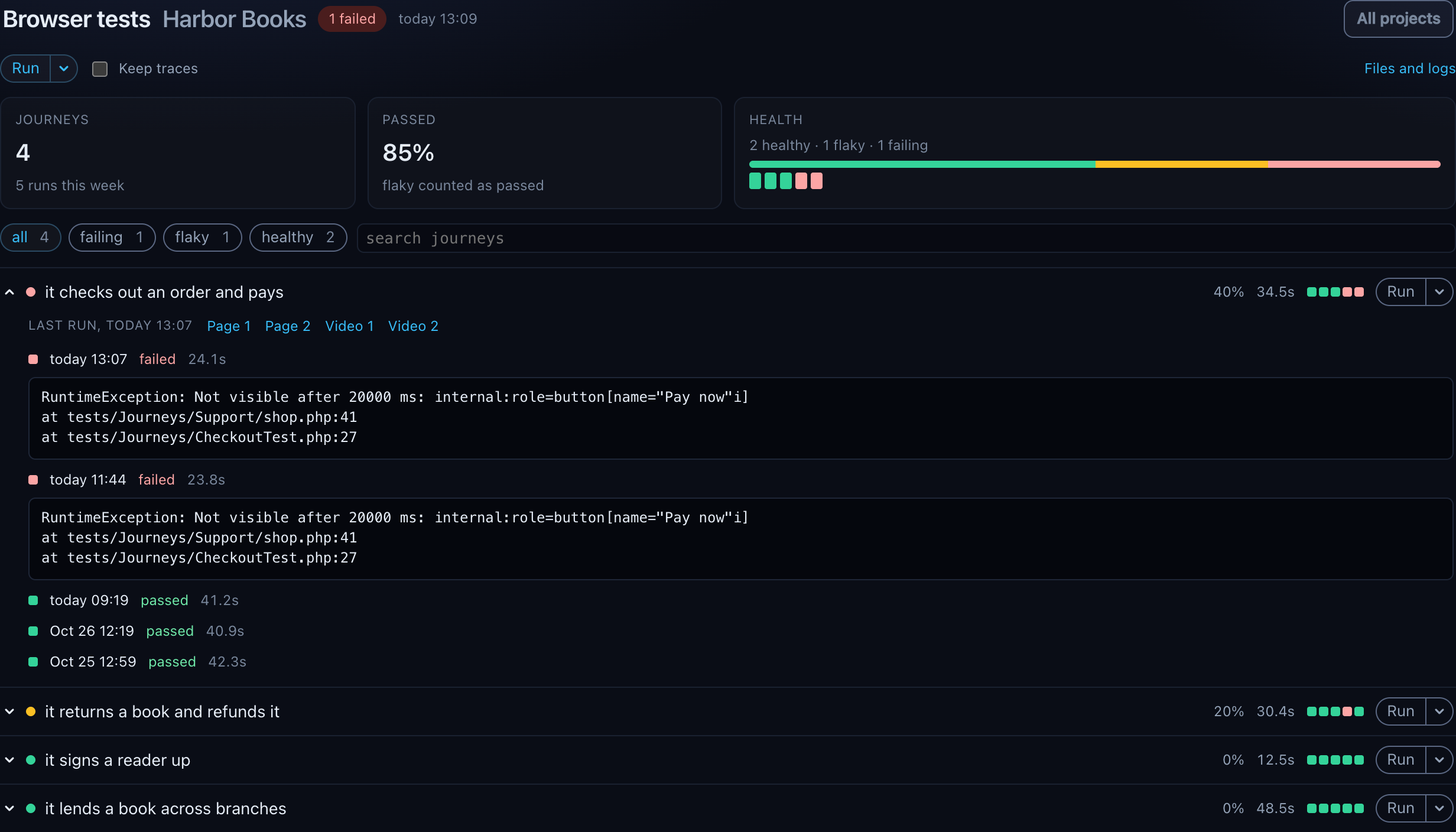
While a run goes, the page says so: running 2 of 5, a bar, each journey in the run marked running and then passed or failed as Pest writes its line, and the run's last lines under Output. A run started in another tab, or a dqx e2e in a terminal, shows as running elsewhere until it ends.
The run's own page (Files and logs) has the failures, the traces of the journeys that passed, and the logs; a trace opens there in Playwright's trace viewer, served by dqx from the site's playwright-core. A journey whose test file is gone leaves the list and the counts.
What is not here
dqx e2e is the local experience. CI keeps its own script: a pipeline runner that forbids host networking and writable mounts cannot reuse this stack, and a build should be reproducible from the repository rather than from a developer's machine.
It also needs the docker backend, because it is the only one that runs containers beside the application. On lerd, Herd or DDEV there is nowhere to put the browsers but the machine itself, which is the install this command exists to replace.